
An AI assistant on your business WhatsApp
Customers write to the number they already know. The assistant reads each message in the language it was written in, answers from your rules and documents, offers open times from the calendar, and hands the chat to a person when one is needed. The thread stays in the inbox, so anyone on the team can open it and continue.
Messages arrive when the whole team is busy
A booking page waits for someone who already decided. Many messages are a question, a photo or a request to move tomorrow instead, and they tend to arrive together: in the morning, at lunchtime and in the evening, while everyone who could answer is with a customer.
A fixed menu of buttons answers only the paths you drew in advance. A normal sentence, in whatever language the customer used, needs someone who can read it. That is the assistant: it replies on the number you already use.
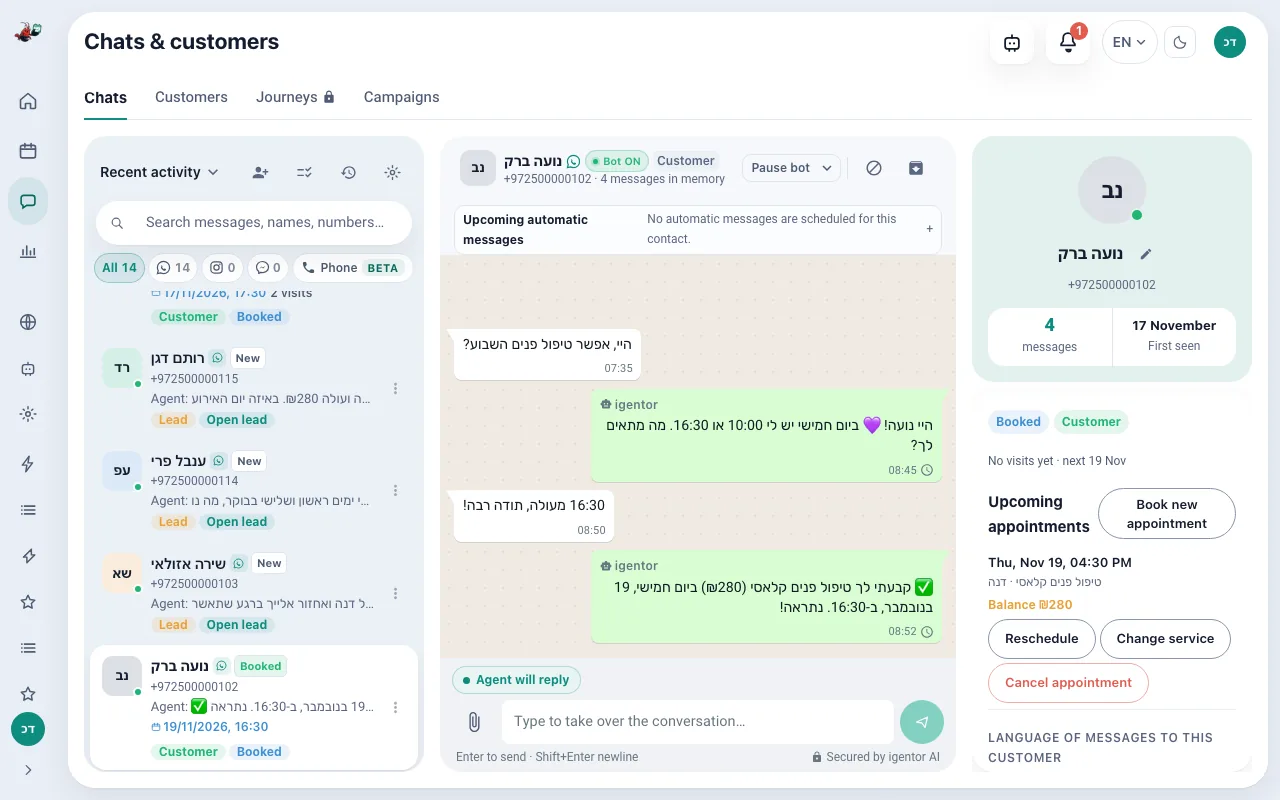
What the assistant does in the conversation
Reads ordinary language
The customer does not have to pick from a menu. A sentence such as “any space Thursday afternoon?” is enough for the assistant to work out what was asked and, when something is missing, to ask one clarifying question.
Answers from your business
You set the tone, the rules, the services and the hours. You can also upload documents the assistant should answer from: PDF, Word, plain text and images, within the limit of your plan. It does not browse your public website on its own.
Replies around the clock
Once the line is connected, new customer messages are answered at any hour, including when the shop is closed. You still see the thread and you can mute the assistant on one chat or on all of them.
Switches language per message
The assistant detects the language of the incoming message and replies in it. A later message in another language is answered in that language. No language setting is required per customer.
Hands the chat to you
A question your rules and documents do not answer is handed to you rather than answered with a guess: that is how the agent is instructed. The customer is told the request went to you, and you get a message. If you have not answered within two hours, you get one reminder. When you reply yourself, the request is closed.
Understands a photo or a voice note
On plans that include it, a photo the customer sends is read and a voice note is transcribed, then answered like text. You can also store photos of your work and say when the assistant should send them.
Example conversation
An example, not a screenshot. A customer writes at night, and nobody from the business is in the thread.
- Hi, do you have anything Thursday after 16:00? And how long does a first visit take?
- Hi. A first visit is 60 minutes. Thursday after 16:00 I have 16:30 or 18:00. Which works?
- 16:30
- Booked: Thursday at 16:30. I will send a reminder before the appointment. If you need to move it, write here.
How the agent differs from WhatsApp Business, a menu bot and a receptionist
| WhatsApp Business app | Menu bot | igentor agent | Receptionist | |
|---|---|---|---|---|
| A message in free text | A fixed reply: greeting, away message and quick replies | Only the options and keywords it was built for | Understands an ordinary sentence and asks one question when a detail is missing | Yes |
| At night and mid-treatment | Away message | Yes, inside the menu | Answers from the rules, services and documents you set | During her working hours |
| Booking | No | Depends on the vendor, often a link | Checks Google Calendar, books, moves and cancels in the chat | Yes, by hand |
| When it has no answer | Nothing | A fixed message | Hands the chat to you and tells the customer it was passed on | Asks you |
| Phone calls | No | No | Yes, with the voice calls add-on (Business and up) | Yes |
| Cost | Free | Subscription plus building the flows | A monthly plan, no per-message fee from igentor; Meta bills template messages by its own price list | A salary |
How a conversation is handled
- The customer messages your existing WhatsApp number. Nothing is installed on their phone.
- The assistant reads the message in the language it was written in and checks your rules, documents and services.
- If the request is a question, it answers. If it is a booking, it checks the calendar and offers open times.
- If only you know the answer, or the customer asks for a person, the thread is handed to you.
- You can open the same thread in the dashboard and continue it yourself. Your reply pauses the assistant in that chat.
What changes for the business
Questions that used to wait until morning get an answer while the customer is still in the chat.
Each customer has one thread with its history, so whoever picks it up next does not have to ask a colleague what was said.
You decide the topics that always come to you, and you can mute the assistant on a sensitive chat.
The same assistant can also answer Instagram Direct and Facebook Messenger on Business and up, in the same inbox.
What it connects to
- Your existing WhatsApp number, connected through Meta's official WhatsApp Business Platform.
- Google Calendar, when the conversation turns into an appointment.
- Instagram Direct and Facebook Messenger on Business and up, with the same rules and the same calendar.
- Telegram is for you, the owner, not for customers. That assistant is described on its own page.
The customer assistant runs during the free trial and on paid plans. The public booking page stays free after the trial. Instagram and Messenger are part of Business and up. Document limits depend on the plan.
PricingWhat does it cost?
The booking page stays free forever, and sign-up needs no credit card. The agent that answers, books and reminds comes with the paid plans, all listed on the pricing page.
Questions about the WhatsApp assistant
Do customers have to install an app?
No. They keep writing to your existing WhatsApp number. You connect that number from the dashboard through Meta's official WhatsApp Business Platform.
Will it invent an answer?
It is instructed to answer from your rules, services and documents. A fact that is not there is handed to you instead of being guessed.
Can I stop it in one conversation?
Yes. You can mute it on one chat or on every chat, and you can type in the thread yourself. Your message pauses it in that chat.
Does it answer phone calls?
With the voice calls add-on, yes: on Business and up the same assistant answers the business's phone number by voice and books appointments. Without it, it answers messages: WhatsApp, and on Business and up also Instagram and Messenger, and a voice note inside WhatsApp can be transcribed on plans that include media.
Does it learn my public website by itself?
No. You add what it should know: rules, services, and uploaded documents. There is no automatic crawl of your website.
Businesses that use this
See it answer on your number
Start a free trial of Pro features, with no card. Connect WhatsApp and send yourself a message from another phone.
Start your free trial