
Lead management inside WhatsApp
When inquiries come from several ads and channels at once, a spreadsheet someone fills in by hand falls behind. Here the inquiry stays on the conversation itself, with a stage you can filter and the channel or ad it came from.
Leads disappear into the chat list
When every inquiry is just another WhatsApp thread and several people answer from the same number, the ones that did not book look the same as the ones that did. A week later nobody can say which conversations still need a person, or who was meant to follow up.
igentor keeps the inquiry on the contact: the thread, notes, a stage, and the first channel. You work the list in the dashboard instead of scrolling the phone.
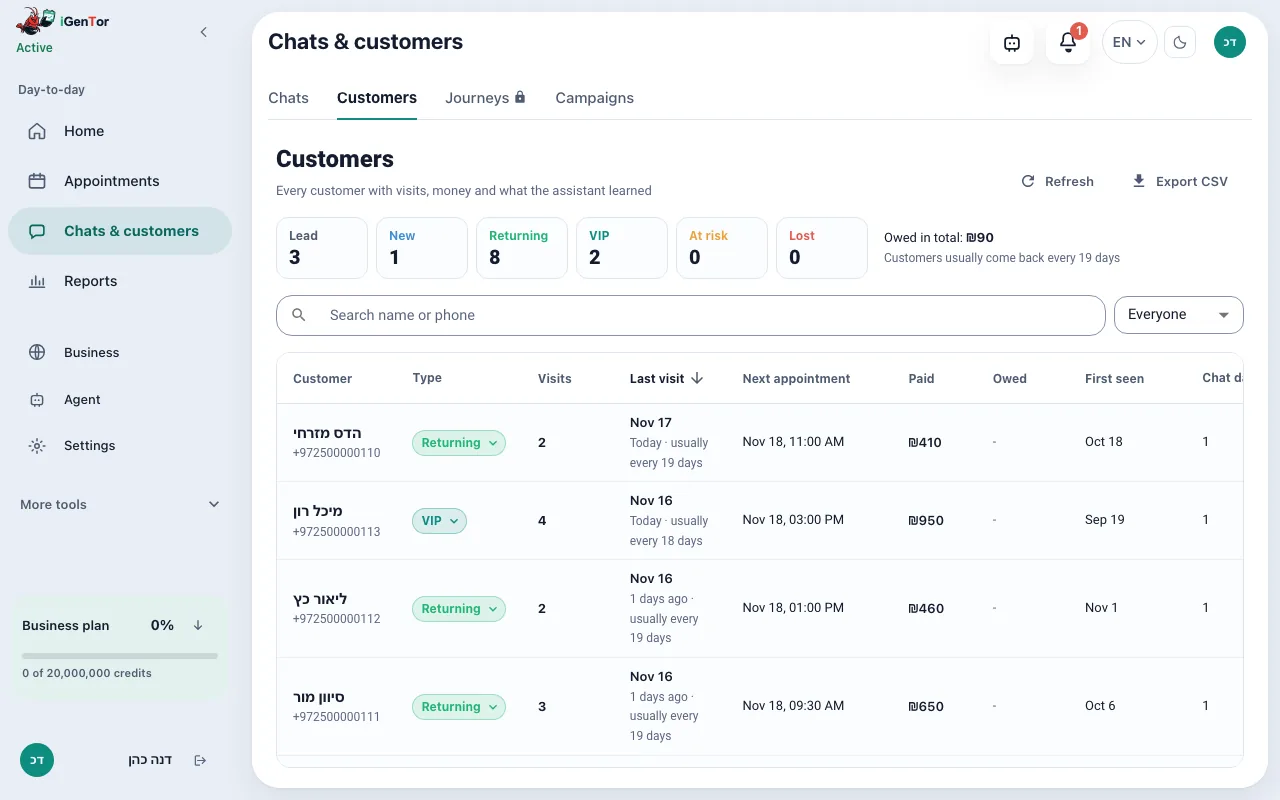
What you can do with a lead
Captured from the first message
A new customer conversation is kept as a lead with its history. You can add notes on the contact. Contacts can be imported from a CSV file, and the customer list can be exported.
A stage on the conversation
On Pro and up, each lead has a stage: new, in progress, offer, booked, won or lost. You can set the stage yourself. The assistant may move a lead to in progress, offer or lost. The list can be filtered by stage, and analytics shows how many leads reached each stage in the period.
Where the lead came from
The first message records the channel: WhatsApp, Instagram or Messenger. When a Click-to-WhatsApp ad is attached to the message, the ad is stored too. The report “Where customers came from” counts leads, bookings and revenue by channel, ad and link. A caller who is answered by voice (voice calls, beta) is saved as a lead too, but the phone is not a separate channel in this report.
Replies that know the ad
On Business Plus, the reply itself takes into account which Click-to-WhatsApp ad the customer came from, so someone who clicked an ad for one service is not answered as if they asked about another.
Leads that did not close
On Business and up, a report lists leads that did not become a booking, so they are not only visible while the chat is still open. This is a list for you to act on. It is not an automatic sequence of chase messages.
Follow-up that goes out on its own
The messages that go out by themselves are a reminder before an appointment, an optional message after the visit and, on Business and up, one nudge to someone who started booking and stopped, sent after a delay you set, from 1 minute to 24 hours. A weekday automation can also message you, the owner, about the pipeline. There is no automatic drip to every lead. The exception: on Business Plus, where AI lead follow-up is open for the account, you can start up to three follow-up messages for a lead that showed interest without booking.
Example
An example of how a lead looks in the thread, not a screenshot of the dashboard.
- Hi, I saw your ad. Do you have prices for a first visit?
- Hi. A first visit is 60 minutes. I can send the price list and, if you want, two open times this week.
- Send the times, I will check with my partner.
- Thursday 16:30 or Sunday 11:00. Write back when you know, and I will hold nothing until you confirm.
From the first message to a stage
- The message arrives on WhatsApp, or on Instagram or Messenger if you connected them. On Business and up the customer can also phone in and get a voice answer.
- The contact is stored with the thread. The first touch records the channel and, when present, the ad.
- The assistant answers and, on Pro and up, the lead can move through the stages.
- You filter the inbox by stage and open anyone who is still waiting.
- A booking writes the appointment to Google Calendar. A lead that never booked stays visible in the unclosed report on Business and up.
What you stop losing
The inquiry and the conversation stay together, so the next person who opens the chat sees what was already said.
You can see which channel or ad produced leads, bookings and revenue, without a separate spreadsheet.
Open leads are a filter and a report the whole team can see, instead of a list in one person’s head at the end of the day.
Follow-up messages that do send are tied to a booking event; follow-up for a lead who did not book (up to three messages) exists only on Business Plus where it is open for the account.
Sources and tools
- WhatsApp is the primary source. Instagram, Messenger and phone calls join the same inbox on Business and up.
- Click-to-WhatsApp ads are recorded when the incoming message carries the ad referral.
- The public booking page keeps its own link and campaign parameters on the booking.
- Google Calendar receives the appointment once the lead books.
Saving the conversation is part of the assistant. Stages, the customer table and the lead funnel open on Pro and up. The unclosed-leads report and the unfinished-booking nudge open on Business and up. Replies that know the ad are Business Plus.
PricingWhat does it cost?
The booking page stays free forever, and sign-up needs no credit card. The agent that answers, books and reminds comes with the paid plans, all listed on the pricing page.
Questions about leads
Is there a board of deal cards?
No. Leads are the conversations in your inbox, with a stage you can filter, plus a customer table. There is no board of deals.
Does every lead get an automatic follow-up sequence?
No. Automatic messages are the appointment reminder, an optional note after the visit, and, on Business and up, one nudge when a booking was started and not finished. On Business Plus, where AI lead follow-up is open for the account, you can also start up to three follow-up messages for a lead that showed interest without booking, and you see the first one before it goes out. Anything else is a campaign you send yourself, or a message you ask the owner assistant to send.
Can I see which ad a lead came from?
Yes, when the first WhatsApp message carries a Click-to-WhatsApp ad referral. Organic chats are stored as organic, with their channel. The analytics report groups leads, bookings and revenue by channel, ad and link.
Can I import contacts?
Yes. Contacts can be imported from a CSV file, and the customer list can be exported.
What counts as won or lost?
You can set the stage, including won and lost. The assistant is only allowed to set in progress, offer or lost. A booking is recorded as booked when an appointment is made.
Businesses that use this
Keep the next inquiry
Start a free trial. Connect WhatsApp, send a test message, and see the lead appear with its conversation.
Start your free trial