
A CRM that starts from the WhatsApp conversation
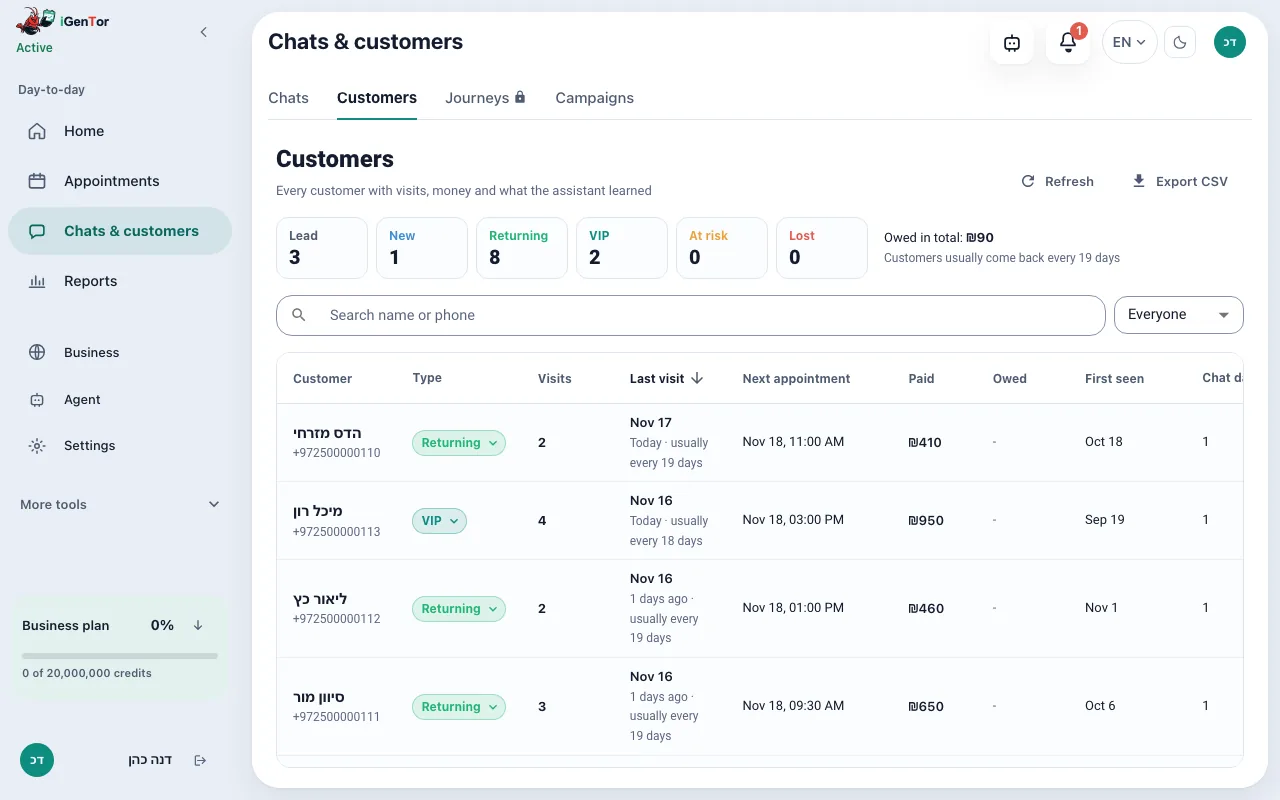
The customer record builds itself from the chats and appointments already in the system: visits, the next appointment, payments and notes, on one row. It is a customer table with no deal board. Stages on a conversation are described on the leads page.
The history is in the phone, the money is in the calendar
When several people answer the same WhatsApp, whoever opens the chat needs to know who this person is, when they last came, what they booked next and what was said, without asking the colleague who served them last time.
Those facts already exist in igentor: messages, appointments, payments you recorded, notes, and short facts the assistant saved. The customer table puts them on one row.
What the customer record holds
One row per customer
On Pro and up, the Customers tab lists each person with their type, visits, last visit, next appointment, amount paid, open balance, and tags. On a phone the same rows are cards.
A type that stays current
The type is lead, new, returning, VIP, at risk or lost. It follows the customer’s own rhythm of visits, and you can lock a type yourself until you set it back to automatic. The assistant can suggest a type, and it will not overwrite one you locked.
The conversation and the appointments
Opening a customer shows the recent appointments, notes, tags, and facts saved from chats. From the row you open the WhatsApp thread. Attendance can be marked when someone did not come.
What the assistant learned
Short facts saved during chats sit on the customer, so the next conversation does not ask for the same detail again. You can read them in the record.
Import and export
Contacts import from a CSV file. The customer list exports to a CSV file, including the columns in the table, without the text of the messages.
Your Google reviews
On Business and up, you can import the reviews your business already has on Google Maps; new ones are added by themselves every month, or every week if you switch that on. After each appointment, customers still rate the visit through your own personal rating link. The booking page shows one rating for your own reviews and your Google listing together, with a line saying where each comes from, and the Google rating refreshes by itself, at most once a week.
How a record fills in
- A customer messages you, or you book them. The contact exists from that moment.
- Appointments, payments and visits update the row. A nightly refresh keeps the counts current on Pro and up.
- The type is calculated from visits and from how often this business’s customers usually return. You can override it.
- You filter the table by type, last visit, or whether a next appointment exists.
- You open the chat, add a note or a tag, or ask the owner assistant about that customer.
What you can see without a second tool
Who is late compared with their own interval, and who already has a next appointment.
How much a customer has paid, and whether anything is still open.
The last service and the last staff member, next to the thread.
A type such as VIP or at risk that the team can filter, and that the assistant can see during the chat.
Where the data comes from
- WhatsApp, Instagram and Messenger conversations, and phone calls.
- Appointments in Google Calendar and on the booking page.
- Payments you record on the appointment.
- Notes and facts saved by you or by the assistant.
The customer table, types and the lead stages open on Pro and up. Below that you still have the conversation inbox. Message text is not included in the CSV export. Importing Google Maps reviews is Business and up.
PricingWhat does it cost?
The booking page stays free forever, and sign-up needs no credit card. The agent that answers, books and reminds comes with the paid plans, all listed on the pricing page.
Questions about the CRM
Is this a board of deals?
No. You get a customer table and, on the conversation, a stage. Deals are not laid out as cards on a board.
Who is counted as returning?
Someone with more than one visit. VIP, at risk and lost use this business’s own visit rhythm, not a fixed number of days copied from another trade.
Can the assistant change a type I set?
Not while you have locked it. You can set the type back to automatic when you want the rules to take over again.
Does the record include the chat transcript in the export?
The CSV includes the customer columns, not the message text.
Do I have to type the customers in?
No. They appear from conversations and appointments. You can also import contacts from a CSV file.
Businesses that use this
Open the customer list
Start a free trial of Pro features. The customer table fills from the chats and appointments you already create.
Start your free trial